

Quick Answer
A soft 404 error occurs when a webpage returns a 200 (OK) status code but appears empty or low-value to Google’s systems. When this happens, Google may classify the page as a soft 404 and reduce its indexing priority.
To fix soft 404 error issues correctly, the page must either be improved, redirected to a relevant alternative, or removed using the proper HTTP status code
According to Google Search Central documentation, this situation typically happens when a page technically exists but behaves like a missing page — for example:
• pages with extremely thin or placeholder content
• removed pages still returning 200 status
• irrelevant redirects (often to the homepage)
• empty category or filter pages
To fix a soft 404 error correctly, the recommended process is:
- Identify affected URLs in Google Search Console → Pages → Soft 404
- Determine whether the page should be improved, redirected, or removed
- Return the correct HTTP status code (404, 410, or 301) if the page no longer exists
- Update internal links pointing to invalid pages
- Validate the fix in Search Console and wait for recrawl
If soft 404 pages remain unresolved, Google may reduce crawl trust and indexing priority for those URLs over time.
Understanding how to fix soft 404 error situations properly is important because unresolved cases can reduce crawl efficiency and slow indexing across the website.
Soft 404 Error Fix Checklist
If you want to fix a soft 404 error quickly, follow this checklist:
• Check affected URLs in Google Search Console
• Decide whether the page should be improved, redirected, or removed
• Use the correct status code (404, 410, or 301)
• Fix internal links pointing to removed pages
• Validate the fix inside Search Console
This simple audit usually resolves most soft 404 error cases within a few crawls.
I Don’t Treat Soft 404 as a Minor Warning
The first time I had to fix soft 404 error issues in Google Search Console, I didn’t panic.
The pages were loading.
No visible errors.
No broken design.
But impressions were stalling.
That’s when I realized something most site owners miss:
A soft 404 error doesn’t break your website — it weakens Google’s confidence in it.
If you don’t fix soft 404 error correctly, you send mixed signals. The page says “I exist.” Google says “This feels empty.” And when that contradiction persists, crawl trust drops, indexing slows, and growth momentum fades quietly.
I’ve seen this happen on small blogs and scaling sites alike.
So now, when I see a soft 404 error, I don’t treat it as a report issue.
I treat it as a structural audit trigger.
Let me show you exactly how I fix soft 404 error the right way — without guesswork, without overreacting, and without hurting crawl efficiency.
Before / After Audit: What Actually Happens
Here’s a real structural pattern I’ve seen multiple times.
This example shows why knowing how to fix soft 404 error signals at the structural level is critical for maintaining a clean indexing profile.
BEFORE (Soft 404 Triggered)
| Signal | What I Found |
|---|---|
| HTTP Status | 200 (OK) |
| Page Content | Thin template / short placeholder |
| Internal Links | Minimal or weak |
| Crawl Behavior | Crawled once, rarely revisited |
| GSC Status | Soft 404 error |
Google crawled the page.
But instead of treating it as valid content, it treated it like a “dead-looking” page.
Not missing.
Not valuable.
That ambiguity creates the soft 404 error classification.
AFTER (Corrected Structure)
| Action Taken | Result |
|---|---|
| Expanded or removed thin content | Clear page purpose |
| Fixed HTTP status code | No ambiguity |
| Improved internal linking | Better crawl path |
| Validated in GSC | Soft 404 removed |
No magic.
Just clarity.
The Real Pattern Behind Soft 404 Error
When I audit soft 404 issues, they usually come from one of these structural mistakes.
Most of the time, learning how to fix soft 404 error classifications requires improving the structural signals surrounding the page rather than simply refreshing the content.
Thin Pages That Look Like Placeholders
Category pages with no products.
Tool pages with 2 lines of text.
Tag pages with nothing unique.
Deleted URLs Still Returning 200
The content is gone, but the server still says “OK”.
Google doesn’t like that contradiction.
Homepage Redirect Abuse
Redirecting every removed page to homepage instead of using 410 or relevant 301.
That’s a classic soft 404 error trigger.
Filter / Parameter URLs
Empty filtered URLs that technically exist but offer no value.
Weak Internal Authority Flow
Pages exist, but no meaningful links point to them.
If you’ve ever dealt with pages that Google crawls but still refuses to index, you already know how important structural clarity is. I go deeper into that exact situation in my guide on Crawled – Currently Not Indexed: The Structural Fix I Use to Trigger Indexing, where I explain why Google sometimes crawls a page but decides not to keep it in the index.
Soft 404 errors belong to the same family of problems — pages technically exist, but the structural signals around them make Google question their value.
Sometimes the issue starts even earlier in the crawl pipeline. Google may discover URLs but delay crawling them entirely, which can later lead to indexing instability or quality signals like soft 404 classifications. I explain that discovery-stage problem in Discovered – Currently Not Indexed: Why Google Finds URLs but Doesn’t Crawl Them.
Understanding how pages move through discovery, crawling, and indexing helps diagnose why some URLs eventually fall into soft 404 reports.
The 3 Rules I Follow Before Fixing Any Soft 404 Error
I never rush to delete.
I apply these rules first.
Rule 1 — Never Return 200 for a Dead Page
If the page is permanently gone, it must return 410 or 404.
A fake 200 status is what creates soft 404 confusion.
Rule 2 — Don’t Redirect Everything to Homepage
Google can detect irrelevant redirects.
If the redirect destination doesn’t match intent, it can still classify it as a soft 404 error.
Using irrelevant redirects is one of the fastest ways to create new problems when trying to fix soft 404 error reports.
Rule 3 — Improve OR Remove. No Limbo.
Half-built pages waste crawl budget.
And if you want to understand why crawl efficiency matters for growing sites, it helps to understand What Crawl Budget Means in SEO and How Google Prioritizes Pages. Weak pages don’t just sit quietly — they slow down how search engines process the rest of your site.
How Google Detects a Soft 404 Error
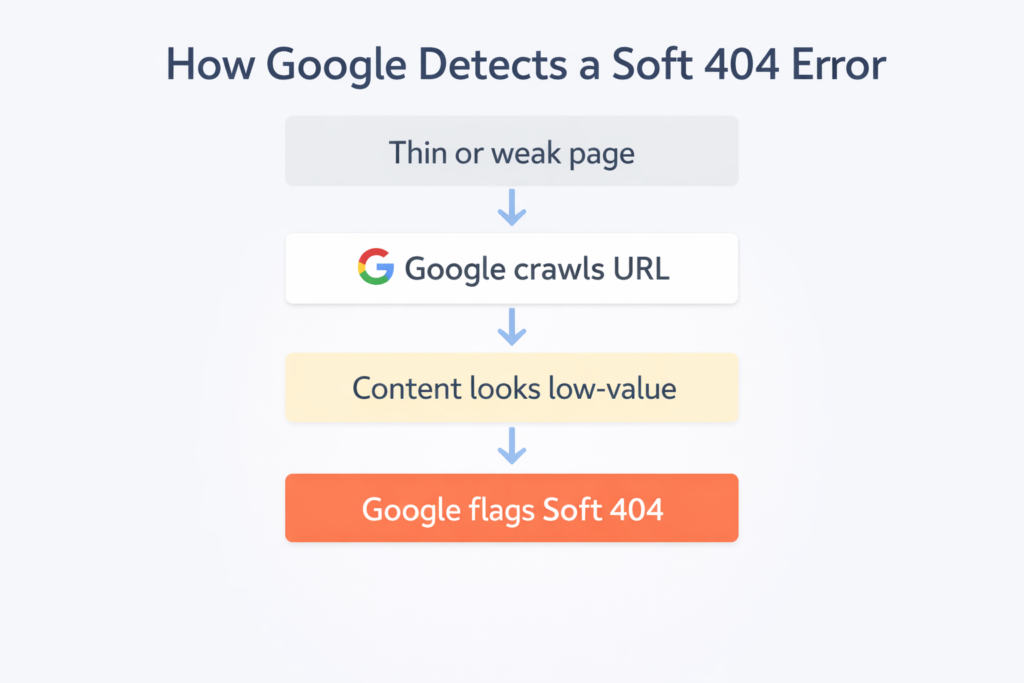
The classification usually follows a simple pattern:
Thin or misleading page
↓
Google crawls the URL
↓
Content appears empty or low-value
↓
Google flags the page as Soft 404
This is why a page returning 200 OK can still be treated as a soft 404 error if the content signals appear weak.
How I Fix Soft 404 Error (Exact System)
Step 1 — Identify Soft 404 URLs
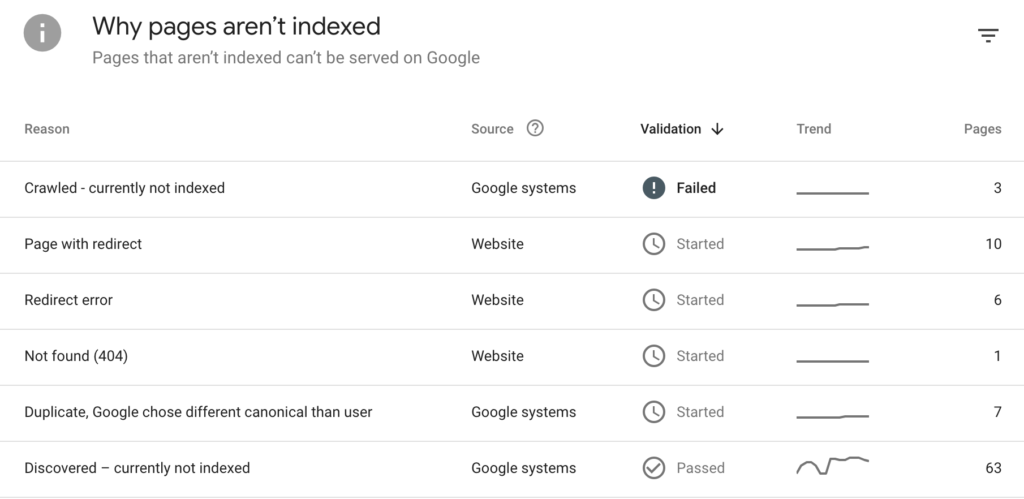
Go to Google Search Console → Pages → Soft 404.
Export affected URLs.
Then I double-check indexing using my Google Index Checker tool, because sometimes the issue is historical rather than current.
Step 2 — Classify Each URL
I categorize every soft 404 error like this:
| Page Type | My Decision |
|---|---|
| Thin but valuable | Expand & strengthen |
| Replaced by better page | 301 redirect |
| Permanently removed | 410 status |
| Completely useless | True 404 |
No emotional decisions.
Only structural decisions.
Step 3 — Strengthen Pages Worth Keeping
If the page deserves to live, I:
Expand content depth
Add meaningful internal links
Improve clarity of purpose
Remove template clutter
In some cases, indexing instability also comes from canonical conflicts. When multiple URLs compete for the same content signals, Google may struggle to decide which version is the real one. I explain how to resolve that situation in Duplicate Without User-Selected Canonical: How to Fix Canonical Conflicts.
Correcting canonical signals often stabilizes how Google evaluates page quality.
Step 4 — Fix the Status Code Correctly
If the page must be removed:
410 for permanently gone
404 for missing
301 only if highly relevant alternative exists
I generate clean redirects using my Htaccess Redirect Generator.
No homepage dumping.
No redirect chains.
Clear signal.
According to Google Search Central documentation, soft 404 issues happen when a page returns a success status but appears empty or misleading.
That means the fix must be structural, not cosmetic.
Step 5 — Check Internal Links
If internal links still point to removed pages, the soft 404 problem persists.
I usually scan the site using my Broken Links Finder to locate outdated references and update them before validating the fix.
Step 6 — Validate Fix in Search Console
After correcting the soft 404 error:
Click “Validate Fix”
Wait for recrawl
Monitor impressions and crawl activity
Soft 404 error usually clears within a few weeks if properly fixed.
Soft 404 vs Real 404 (Quick Technical Comparison)
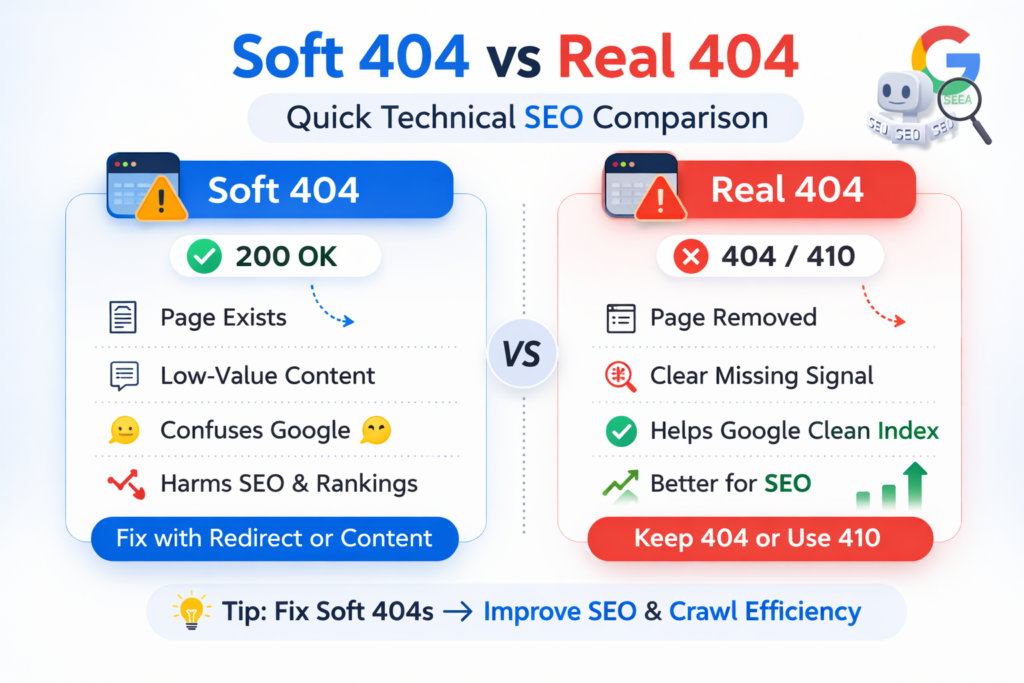
| Element | Soft 404 Error | Real 404 |
|---|---|---|
| HTTP Status | 200 | 404 |
| Google View | Low-value page | Properly missing |
| Crawl Impact | Wasted crawl signals | Clean removal |
| SEO Impact | Structural confusion | Neutral |
A real 404 is clean.
A soft 404 error is confusing.
Google punishes confusion.
When I Intentionally Leave a 404 Alone
Not every soft 404 error needs saving.
If a page:
Has no backlinks
Has no strategic intent
Has no internal importance
I remove it properly.
In some cases, Google may crawl a page but still refuse to index it because the surrounding signals remain weak. When diagnosing those situations, I often apply the same framework I describe in Crawled – Currently Not Indexed: My Structural Fix Framework, because the underlying structural issues are closely related.
The Bigger Picture
Soft 404 error is not just a warning — it’s a signal that you need to fix soft 404 error at the structural level, not just refresh the page or request indexing again.
It’s a signal that your architecture has weak spots.
On a small site, it’s minor.
On a growth-focused site targeting aggressive traffic expansion?
It compounds.
Soft 404 pages:
Dilute crawl efficiency
Reduce structural trust
Slow indexing momentum
When I fix soft 404 error, I don’t just remove a report warning.
I restore clarity.
And clarity is what Google rewards.
FAQs
1. What causes a soft 404 error in Google Search Console?
A soft 404 error usually happens when a page returns a 200 OK status but looks low-value, empty, misleading, or irrelevant to Google. Common causes include thin content, deleted pages still returning 200, empty category or filter pages, and irrelevant redirects.
2. How do I fix a soft 404 error without hurting SEO?
The right fix depends on the page’s purpose. If the page still has value, improve the content and strengthen internal links. If the page is gone permanently, return a proper 404 or 410 status. If a highly relevant replacement exists, use a 301 redirect.
3. Is a soft 404 error bad for indexing?
Yes. If left unresolved, a soft 404 can waste crawl activity, weaken page trust, and reduce the chance that Google will keep the page indexed or revisit it frequently.
4. What is the difference between a soft 404 and a real 404?
A real 404 correctly tells search engines that the page does not exist. A soft 404 returns a success status like 200 OK, but Google still considers the page low-value or functionally missing.
5. Should I redirect a soft 404 page to the homepage?
No, not by default. Redirecting every weak or removed page to the homepage can create more soft 404 issues if the destination is not closely relevant. Only use a 301 redirect when the replacement page clearly matches the original intent.
6. Can thin content trigger a soft 404?
Yes. Pages with very little unique information, placeholder text, empty templates, or no clear purpose can be interpreted by Google as soft 404 pages even when they technically load correctly.
To Sum Up
Soft 404 errors are often misunderstood because the page technically loads without visible problems. From a user’s perspective the page may appear normal, but from Google’s perspective the signals surrounding the page suggest that it does not provide meaningful value.
Search engines rely on structural signals — content depth, internal linking, HTTP status codes, and page intent — to determine whether a page deserves to remain in the index. When those signals conflict, Google may classify the page as a soft 404 even if the server reports a successful response.
For growing websites, resolving these issues quickly is important. Pages that appear weak or ambiguous can dilute crawl efficiency, slow indexing of new content, and create uncertainty in how Google evaluates the site’s architecture.
That is why fixing a soft 404 error should never be treated as a simple Search Console warning. It is a signal that something in the page structure, content quality, or site architecture requires clarification.
The correct approach is straightforward: either strengthen the page so that its purpose and value are clear, or remove it cleanly using the proper HTTP status code. When every page on a site communicates a clear signal — whether it exists, redirects, or no longer belongs in the index — search engines can crawl and evaluate the site far more efficiently.
In technical SEO, clarity is always rewarded.
And eliminating soft 404 errors is one of the simplest ways to maintain that clarity.