

Quick Answer
Google sitemap priority is an XML sitemap setting that website owners can use to indicate the relative importance of individual URLs. However, Google ignores the <priority> and <changefreq> values when processing XML sitemaps.
Instead, Google can use accurate <lastmod> dates to understand when a page was significantly updated. Submitting a sitemap also helps Google discover URLs, but it does not guarantee that those pages will be crawled or indexed.
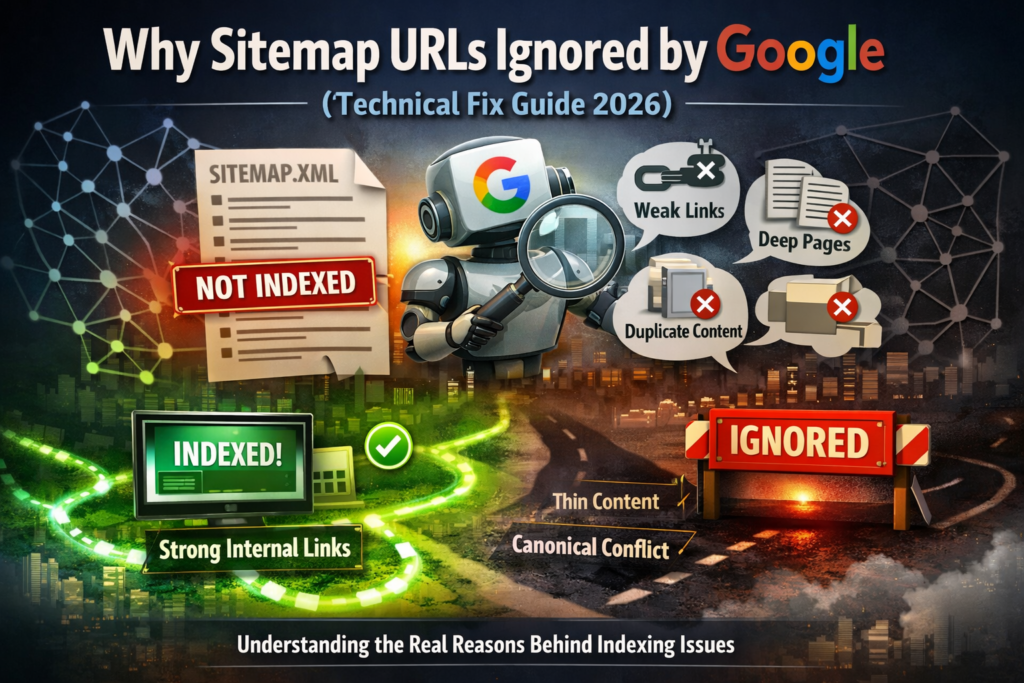
If your sitemap URLs remain unindexed, investigate the actual causes, including:
- Incorrect or conflicting canonical URLs.
- Pages blocked by robots.txt or marked
noindex. - Duplicate or low-value content.
- Weak internal linking and page discoverability.
- Crawling and indexing issues reported in Google Search Console.
Understanding how Google processes sitemap information helps you distinguish between ignored sitemap metadata and genuine indexing problems.
Introduction
Submitting an XML sitemap helps Google discover important pages on a website. However, adding a URL to a sitemap does not guarantee that Google will crawl or include that page in its search index.
This creates a common problem for website owners: URLs appear correctly in their sitemap and Google Search Console, but some pages remain unindexed.
The reasons can vary. Google may discover a URL but delay crawling it, encounter technical restrictions, identify duplicate content, or decide not to include a crawled page in its index.
It is also important to understand that sitemap metadata does not control Google’s indexing decisions. In particular, changing XML sitemap priority values will not force Google to crawl or rank a page.
This guide explains how Google processes sitemap URLs, why submitted pages may remain unindexed, and how to diagnose and resolve common sitemap and indexing problems using Google Search Console.
Symptoms: How to Identify Sitemap Indexing Problems
When Google does not index URLs submitted through an XML sitemap, Google Search Console can help identify the reason.
Open the Page Indexing report and examine the status assigned to each affected URL.
Common indexing statuses include:
| Google Search Console Status | What It Means |
|---|---|
| Crawled – currently not indexed | Google crawled the page but has not included it in its index. |
| Discovered – currently not indexed | Google knows the URL exists but has not crawled it yet. |
| Blocked by robots.txt | Google cannot crawl the URL because of a robots.txt restriction. |
| Excluded by ‘noindex’ tag | The page contains a directive telling search engines not to index it. |
| Duplicate without user-selected canonical | Google identified duplicate content but no canonical URL was specified by the website owner. |
| Submitted URL marked ‘noindex’ | A URL submitted in the sitemap contains a noindex directive. |
These statuses indicate different technical or indexing conditions. They should not all be treated as sitemap errors.
For example, a page marked as crawled but currently not indexed requires a content and indexing assessment, while a URL blocked by robots.txt requires checking the website’s crawling rules.
The important step is to identify the specific reason shown in Google Search Console before deciding what needs to be fixed.
Decision Block: Why Google May Ignore Sitemap URLs
Before troubleshooting sitemap indexing problems, check whether the URLs in your XML sitemap meet Google’s technical requirements.
A sitemap helps Google discover important pages, but submitting a URL does not guarantee that Google will crawl or index it.
Use the following checklist to identify common problems:
| What to Check | What You Should Verify |
|---|---|
| Canonical URLs | Include the preferred, canonical version of each page in your sitemap. |
| Indexing directives | Make sure pages intended for indexing do not contain a noindex directive. |
| Robots.txt | Check that important pages are not unintentionally blocked from crawling. |
| HTTP status | Sitemap URLs should lead to accessible pages that return a successful HTTP response. |
| Duplicate URLs | Avoid including multiple URLs that lead to substantially identical content. |
| Internal linking | Make important pages discoverable through relevant links from other pages on your website. |
| Last modified date | Provide an accurate <lastmod> value when significant content changes occur. |
Understand the Sitemap Priority Setting
Google sitemap priority helps website owners describe the relative importance of URLs, but Google does not use this value to determine crawling frequency or indexing priority.
One common misunderstanding concerns the <priority> and <changefreq> elements in XML sitemaps.
Although these elements are part of the sitemap protocol, Google ignores both values when processing sitemaps.
Google can use the <lastmod> element when its value accurately reflects significant changes to the page.
Therefore, changing every URL’s priority to 1.0 will not force Google to crawl or index those pages.
Does Google Use Sitemap Priority and Change Frequency?
XML sitemaps support several optional attributes designed to describe how website URLs are organized and updated. However, not all of these attributes influence Google’s crawling and indexing process.
According to Google’s official sitemap documentation, Google ignores the <priority> and <changefreq> values.
Here is what each attribute does:
| XML Attribute | Purpose | Google’s Treatment |
|---|---|---|
<priority> | Indicates the relative importance of a URL within a website | Ignored |
<changefreq> | Suggests how frequently a page is expected to change | Ignored |
<lastmod> | Specifies when a page was last significantly modified | Used when consistently accurate |
Why Sitemap Priority Does Not Improve Indexing
The <priority> attribute allows website owners to assign relative importance to individual URLs, typically using values between 0.0 and 1.0.
However, assigning a homepage a priority of 1.0 or an article a priority of 0.9 does not force Google to crawl or index those pages faster.
Google evaluates URLs using its own crawling and indexing systems rather than relying on manually assigned sitemap priority values.
Why Accurate Last Modified Dates Matter
Unlike priority and change frequency, the <lastmod> attribute can help Google understand when a page has undergone significant changes.
For example, updating an article’s main content, adding important information, or changing relevant links may justify updating its last modification date.
However, changing a copyright year or making a minor cosmetic adjustment should not automatically trigger a new <lastmod> date.
Google relies on consistency and accuracy when evaluating this information.
Practical recommendation: Keep your XML sitemap clean, use accurate modification dates, and focus on making important pages accessible through relevant internal links. Sitemap attributes cannot replace a well-organized website structure or valuable content.
When Should You Investigate Further?
If a sitemap URL remains unindexed despite having the correct technical configuration, inspect the individual URL in Google Search Console.
Check its indexing status, Google-selected canonical URL, last crawl date, and any reported indexing issues.
This helps distinguish between sitemap configuration problems, crawling restrictions, duplicate content, and pages that Google has crawled but not selected for indexing.
Search Engine Insight: How Google Processes Sitemap URLs
Google processes sitemap URLs as part of its URL discovery and crawling systems. However, discovering a URL does not mean that Google will automatically crawl, index, or display it in search results.
Understanding the difference between these stages is essential when investigating sitemap indexing problems.
1. URL Discovery
When Google discovers a sitemap, it can use the URLs listed in that file to identify pages on your website.
A sitemap is particularly useful for helping Google discover new pages, recently updated content, and URLs that may be difficult to find through internal links.
However, sitemap submission does not guarantee that every listed URL will be crawled or indexed.
2. Crawling
After discovering a URL, Google may decide to crawl it.
During this process, Googlebot requests the page and retrieves its content. Accessibility, server responses, robots.txt restrictions, and other technical conditions can affect whether crawling succeeds.
A URL that has been discovered but not crawled may appear in Search Console as Discovered – currently not indexed.
For more information about this status, see our guide on Discovered – Currently Not Indexed.
3. Indexing
Crawling and indexing are separate processes.
After crawling a page, Google analyzes its content, technical signals, and other information to determine whether it should be included in the search index.
A successfully crawled page may still remain outside Google’s index. This can happen for several reasons, including duplicate content, canonical selection, insufficient content value, or other indexing considerations.
This is why a valid sitemap cannot force Google to index every submitted URL.
4. Understanding Sitemap Metadata
Another important distinction concerns the metadata included in XML sitemap files.
Google ignores the <priority> and <changefreq> elements. Changing these values will not force Google to crawl a page more frequently or give it better ranking positions.
Google can use an accurate <lastmod> value to understand when a page has been significantly updated.
Website owners should therefore focus on maintaining accurate sitemap information, consistent canonical URLs, accessible pages, and useful content rather than trying to manipulate sitemap priority values.
Understanding these separate processes helps website owners diagnose why sitemap URLs are discovered but remain unindexed.
Causes of Sitemap Indexing Problems
Google Behavior Toward Sitemaps
To understand why Google may not index submitted sitemap URLs, it is important to distinguish between URL discovery, crawling and indexing.
According to Google’s official sitemap documentation, an XML sitemap provides information about the URLs website owners want search engines to discover.
However, submitting a sitemap is only a hint. Google decides independently whether and when to crawl the listed URLs and whether to include them in its search index.
Google also treats different sitemap elements differently:
<priority>: Google ignores this value when processing XML sitemaps.<changefreq>: Google also ignores this value.<lastmod>: Google can use this value when it accurately reflects significant page updates.
This means that increasing a page’s sitemap priority to 1.0 or changing its update frequency will not force Google to crawl or index it.
Website owners should instead focus on submitting canonical URLs, maintaining accurate modification dates, ensuring pages are accessible to Googlebot, and providing useful content that deserves to appear in search results.
Understanding these limitations is the first step toward diagnosing why sitemap URLs remain unindexed.
Problem Explanation
Signal Conflicts: Why Google May Ignore Sitemap URLs
One reason sitemap URLs may remain unindexed is that different signals across a website point to different versions of a page or provide inconsistent information.
Including a URL in an XML sitemap indicates that you prefer Google to recognize that URL as canonical. However, sitemap inclusion is only one signal, and Google considers other information when evaluating pages.
Common signal conflicts include:
| Signal Conflict | Potential Impact |
|---|---|
| Canonical mismatch | Google may select a different URL as canonical. |
| Duplicate content | Google may group similar URLs and index only one representative version. |
| Weak internal linking | Important pages may be harder to discover through website navigation. |
| Inconsistent URL versions | HTTP, HTTPS, www and non-www versions may create conflicting signals if not properly consolidated. |
| Thin or unhelpful content | Google may decide that a page does not provide sufficient value for search results. |
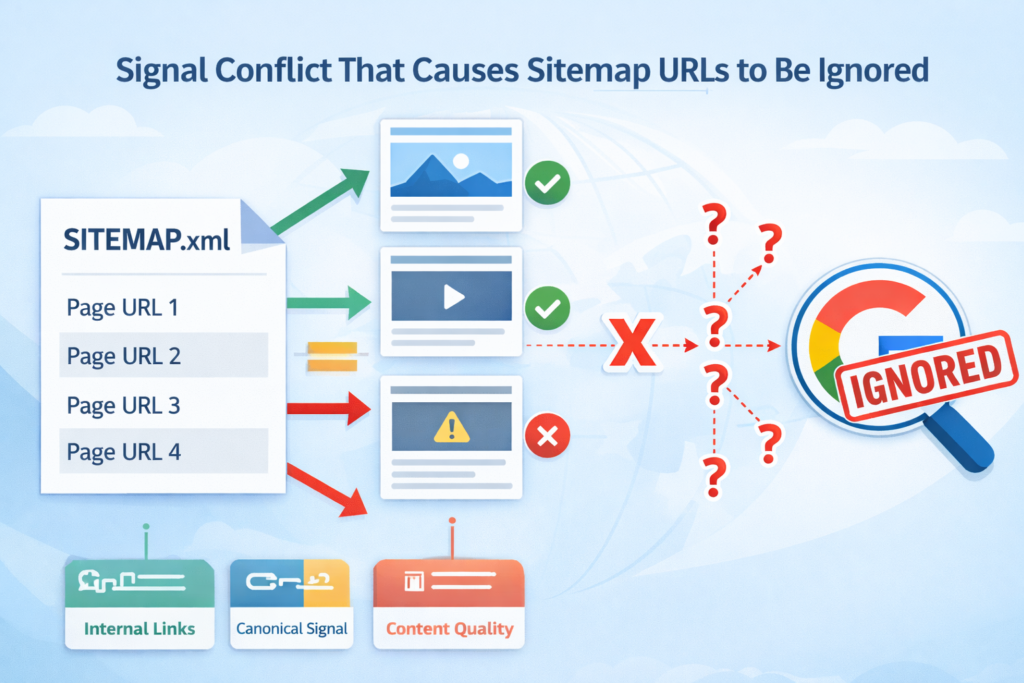
These problems can occur together with canonicalization issues. For example, if Google selects a different URL from the one you intended, investigate the Duplicate Without User-Selected Canonical issue in Google Search Console.
To investigate, compare the URL submitted in your sitemap with the user-declared canonical and Google-selected canonical shown in URL Inspection.
If these URLs differ, check your canonical tags, redirects, internal links and sitemap entries to identify inconsistent signals.
Internal Linking and URL Discovery
Internal linking helps Google discover pages and understand how different sections of a website are connected.
When important articles receive relevant internal links from category pages, related guides and other established content, search engines have additional paths through which to discover those URLs.
For this reason, website owners should avoid relying exclusively on XML sitemaps to introduce important pages to Google.
Consider the following internal linking structure:
| Page Type | Recommended Internal Linking Approach |
|---|---|
| Homepage | Link to important categories and primary website sections. |
| Category pages | Link to relevant articles and resources. |
| Core content pages | Link to related guides and supporting resources. |
| Supporting articles | Link to relevant pillar pages and related content. |
| Isolated pages | Add relevant contextual links from suitable existing pages. |
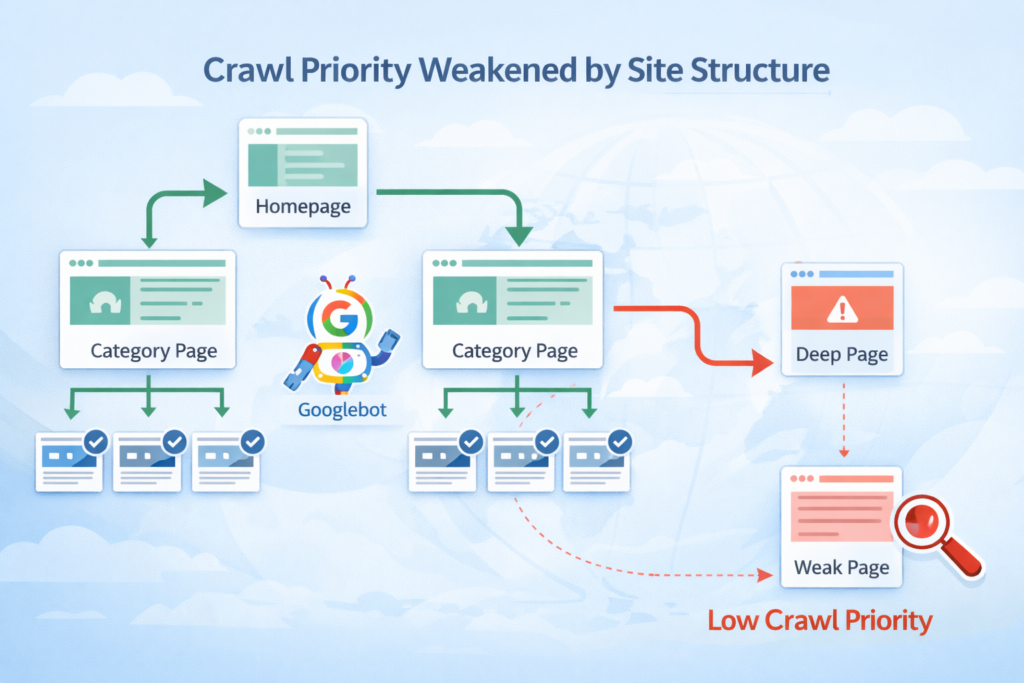
There is no universal number of clicks or internal links that guarantees indexing. The objective is to make important pages accessible through clear, relevant and crawlable links.
Google recommends using standard crawlable links so that its systems can discover pages through the website’s structure.
If your website contains pages that are difficult to discover, review their internal links and make sure they are accessible through relevant navigation and contextual links.
This can improve discoverability, but it does not guarantee that Google will crawl or index every page.
Step-by-Step Fix Process: How to Resolve Sitemap Indexing Problems
If Google is not indexing URLs submitted through your XML sitemap, start by identifying the specific problem rather than changing the sitemap blindly.
Follow these steps to improve URL discovery, resolve technical inconsistencies, and help Google access your important pages.
Step 1 — Strengthen Internal Linking
Make sure important pages are accessible through relevant internal links from your homepage, category pages, and related articles.
Avoid leaving valuable content accessible only through an XML sitemap.
You can review your website’s internal link distribution using the Internal Link Analyzer Tool.
Step 2 — Validate Sitemap Quality
Review your XML sitemap and remove URLs that should not appear in Google Search.
Your sitemap should primarily contain:
- Canonical URLs that you want Google to index.
- Pages that return successful HTTP responses.
- Pages that are accessible to search engine crawlers.
- URLs without unintended
noindexdirectives.
Also check that your sitemap does not contain redirected URLs, duplicate versions, or pages that you have intentionally excluded from search results.
If you need to create or rebuild an XML sitemap, use our XML Sitemap Generator.
Step 3 — Check Indexing Status in Google Search Console
Use Google Search Console to determine which sitemap URLs are indexed and which remain excluded.
Open the Page Indexing report and inspect the affected URLs individually.
You can also use the Google Index Checker to perform supplementary index-status checks.
Remember that third-party index-checking tools do not replace Google’s URL Inspection tool or guarantee that a page is indexed.
Step 4 — Inspect Googlebot Access
Use Google’s URL Inspection tool to examine individual pages that remain unindexed.
Check the following information:
- Whether Google can crawl the page.
- Whether indexing is allowed.
- The last crawl date.
- The user-declared canonical URL.
- The Google-selected canonical URL.
- Any reported indexing problems.
If Google cannot access an important page, investigate its robots.txt rules, server response, redirects, and other technical restrictions.
Step 5 — Improve Page Quality and Resolve Duplicate Content
If Google has successfully crawled a page but has not indexed it, investigate the content itself.
Check whether the page:
- Provides useful information beyond what already exists on your website.
- Has a clear search intent and distinct purpose.
- Contains substantial duplication with other pages.
- Uses the correct canonical URL.
- Provides sufficient value to its intended audience.
Avoid publishing multiple pages that target almost identical search queries without offering meaningfully different information.
After correcting the underlying problems, update the sitemap’s accurate modification date when appropriate and allow Google to recrawl the page.
Technical Insight: How Internal Links Support URL Discovery
A useful way to understand website architecture is through the concept of a crawl graph.
In this model, individual pages represent nodes, while internal links connect those pages.
For example, a homepage may link to category pages, which then link to supporting articles and related resources.
This structure gives search engines additional paths to discover URLs and understand the relationships between different sections of a website.
When important pages have no relevant internal links, discovering them may depend more heavily on other sources, such as XML sitemaps.
Pages that receive few or no internal links can become difficult for search engines to discover through normal website navigation. Learn how to find and fix orphan pages to improve internal link coverage and strengthen website structure.
However, internal linking does not guarantee indexing. Google also evaluates the page’s accessibility, canonical signals, content and other factors when determining whether to include it in search results.
If you are experiencing similar problems with individual pages, read our guide on Why Pages Are Not Indexed by Google.
Another important factor is the number of clicks required to reach a page from the homepage. Review how to reduce crawl depth to make important website resources easier to discover.
The objective is to maintain a website structure in which important pages are accessible, properly connected, and easy for search engines and visitors to understand.
Key Takeaways
- An XML sitemap helps Google discover URLs but does not guarantee crawling or indexing.
- Google ignores the sitemap
<priority>and<changefreq>values. - Accurate
<lastmod>information can help Google understand significant page updates. - Canonical inconsistencies, crawling restrictions, and duplicate content can create indexing problems.
- Relevant internal links improve page discoverability and help search engines understand website structure.
- Google Search Console is essential for diagnosing individual URL indexing problems.
- Improving technical SEO and content quality helps create better conditions for crawling and indexing, but does not guarantee inclusion in Google Search.
Frequently Asked Questions
Why does Google ignore sitemap URLs even after submission?
Submitting a sitemap helps Google discover URLs, but it does not guarantee crawling or indexing. Google may exclude submitted pages because of duplicate content, canonical inconsistencies, crawling restrictions, or other indexing considerations. Check the affected URL in Google Search Console to identify its specific status.
How long does Google take to index sitemap URLs?
There is no fixed indexing timeline. Google crawling and indexing depend on several factors, and some URLs may take days or longer to appear in search results. Submitting a sitemap or requesting indexing does not guarantee inclusion. Monitor individual URLs through Google Search Console.
Should every page on a website appear in the XML sitemap?
No. Include the canonical URLs of pages you want search engines to discover and potentially index. Avoid including redirected URLs, duplicate versions, pages blocked from indexing, and URLs that you intentionally exclude from search results.
Does internal linking help Google discover sitemap URLs?
Yes. Relevant internal links provide additional paths for Google to discover pages and understand their relationships within your website. Important pages should be accessible through crawlable links from relevant sections of your site. However, internal linking does not guarantee indexing.
What is the difference between Discovered – Currently Not Indexed and Crawled – Currently Not Indexed?
Discovered – Currently Not Indexed means Google knows the URL exists but has not yet crawled it.
Crawled – Currently Not Indexed means Google has crawled the URL but has not included it in its search index.
These statuses require different investigations. For discovered pages, examine URL accessibility and internal discovery. For crawled pages, investigate content value, duplication, canonical signals, and indexing eligibility.
Strategic Takeaway
Understanding Google sitemap priority is important because changing XML priority values cannot replace accurate sitemap metadata, effective internal linking, or useful page content.
Understanding why Google does not index sitemap URLs requires looking beyond the sitemap file itself.
An XML sitemap helps Google discover website pages, but inclusion in the sitemap does not guarantee crawling or indexing. Google also considers technical accessibility, canonical signals, duplicate content, and the usefulness of individual pages.
Website owners should focus on maintaining accurate XML sitemaps, resolving conflicting URL signals, strengthening relevant internal links, and publishing useful content that meets visitors’ needs.
Use Google Search Console to investigate individual indexing statuses rather than assuming every excluded URL has the same problem.
A technically sound sitemap combined with a well-structured website gives Google better opportunities to discover and understand your content, although indexing decisions remain under Google’s control.