

Google Search is no longer limited to typed keywords. People now use their cameras, images, and screen selections to discover products, websites, and information.
For SEO professionals and website owners, this creates an important question: How can we measure traffic from Google Lens and other visual search experiences?
The answer is Google’s multimodal reporting capability in Search Console.
Google introduced multimodal performance reporting in September 2026 and expanded its Search Analytics API in November 2026. These developments give website owners new ways to analyze visual search performance as they prepare their SEO strategies for 2027.
In this guide, I’ll explain how the Google Search Console multimodal API works, how to retrieve data using Python, and how to turn that information into practical SEO decisions.
You’ll learn how to:
- Find multimodal search performance in Search Console.
- Retrieve Google Lens-related data through Google’s API.
- Export clicks, impressions, CTR, and position into CSV.
- Identify pages with visual search opportunities.
- Troubleshoot common API errors.
- Build a practical visual SEO workflow for 2027.
1. What Is Google Search Console Multimodal Search?
Multimodal search allows people to search using images and visual information rather than relying exclusively on text.
For example, imagine someone sees a product they like but doesn’t know its name. Instead of typing a description, they photograph it using Google Lens.
Google processes that visual input and displays relevant results.
Supported experiences include:
- Google Lens: Searching using photographs or camera input.
- Circle to Search: Selecting objects or content directly on supported Android devices.
- Image uploads: Uploading pictures to Google Search.
- Chrome image search: Using Chrome’s supported visual search features.
For website owners, these interactions represent another potential source of search visibility.
The important development is that Google now provides dedicated reporting for multimodal search.
Previously, understanding visual discovery through traditional Search Console reports was more difficult.
Today, the reporting allows website owners to examine how their content performs across supported multimodal experiences.
Why multimodal search matters in 2027
Traditional SEO starts with understanding search intent and the keywords people enter into Google.
Visual search adds another dimension.
Someone looking for a product might not know its name. Someone researching a plant might upload its photograph. Another user might circle an object on their screen.
These searches can lead people to relevant websites.
That makes visual content, contextual information, mobile usability, and image accessibility increasingly relevant to a comprehensive SEO strategy.
However, multimodal optimization should complement traditional SEO, not replace it.
2. What’s New for Multimodal SEO in 2027?
The foundation of Google’s current multimodal reporting was introduced through two important updates in 2026.
| Date | Google update | Why it matters |
|---|---|---|
| September 24, 2026 | Web multimodal performance reporting | Introduced dedicated visual search reporting in Search Console |
| November 16, 2026 | Search Analytics API expansion | Enabled programmatic access to multimodal performance |
| 2027 | Practical reporting workflows | Website owners can use these capabilities in their 2027 SEO strategies |
The November update introduced three notable API capabilities:
- Web multimodal reporting.
- Branded and non-branded query classification.
- Multiple-country and multiple-device filtering.
The most relevant change for this tutorial is the new search type:
webMultimodal
This parameter allows developers to request supported multimodal performance data.
For SEO professionals, it opens the door to automated reporting, custom dashboards, and more detailed page-level analysis.
Official reference: Google Search Central — Search Analytics API Update.
3. Google Lens vs. Google Images: Understanding the Difference
One common mistake is treating Google Lens and Google Images as identical traffic sources.
They are not the same reporting category.
| Feature | Google Images | Web multimodal search |
|---|---|---|
| API type | image | webMultimodal |
| Typical behavior | Browsing image results | Searching through images or visual selections |
| Supported experiences | Google Images | Google Lens, Circle to Search, image uploads |
| Reporting | Image search performance | Multimodal search performance |
| SEO analysis | Image visibility | Visual discovery performance |
Consider two situations.
Example A: A user types “modern office desk” and browses Google Images.
Example B: A user photographs an office desk using Google Lens to find similar products.
Although both involve images, the discovery experiences are different.
When analyzing performance, I recommend reviewing the reporting categories separately.
This makes it easier to understand which search experiences contribute to your website’s visibility.
4. How to Find Multimodal Search Data in Google Search Console
You don’t need to write code to begin exploring multimodal performance.
Google Search Console provides a reporting interface for supported properties.
Step-by-step instructions
- Open Google Search Console.
- Select your verified website property.
- Navigate to Performance → Search results.
- Open the search-type filter.
- Select Web multimodal, if available.
- Apply the filter.
- Review your performance metrics.
You can examine four core metrics.
| Metric | Meaning | SEO application |
|---|---|---|
| Clicks | Visits generated from reported search interactions | Evaluate traffic contribution |
| Impressions | Reported appearances in search results | Measure visibility |
| CTR | Percentage of impressions resulting in clicks | Assess click performance |
| Average position | Average reported search position | Understand ranking distribution |
Example: Calculating CTR
Suppose a page receives:
- 2,500 impressions.
- 40 clicks.
The calculation is:
CTR = (40 ÷ 2,500) × 100 = 1.6%
A low CTR can justify further investigation, but it doesn’t automatically prove that the page has poor content.
Search intent, ranking position, result presentation, and query context all affect click performance.
What if the multimodal filter is missing?
Possible explanations include reporting availability, property eligibility, or the absence of reportable multimodal activity.
Check your selected property and date range before drawing conclusions.
5. How Does the Google Search Console Multimodal API Work?
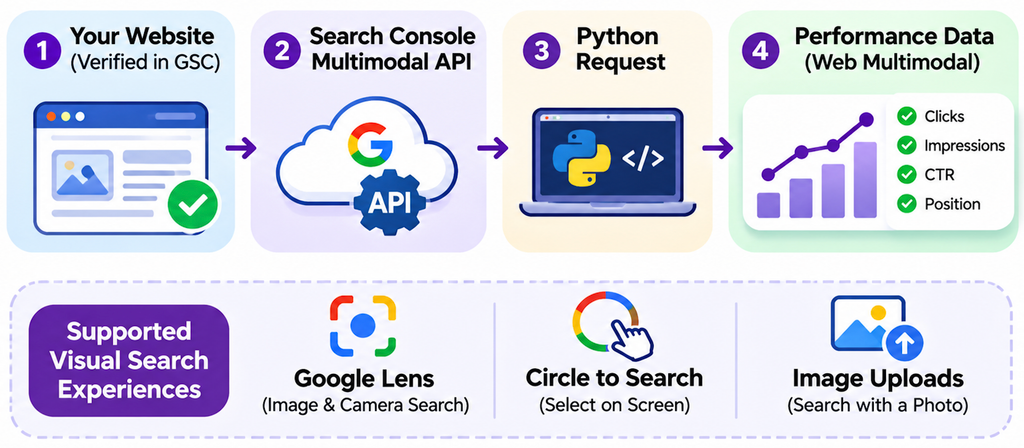
The Google Search Console multimodal API uses the existing Search Analytics API infrastructure.
You do not need to install a separate visual search API.
The endpoint is:
POST https://www.googleapis.com/webmasters/v3/sites/{siteUrl}/searchAnalytics/queryThe important difference is the request body.
For multimodal reporting, set the type parameter to webMultimodal.
Example API request
{
  "startDate": "2026-11-01",
  "endDate": "2026-11-20",
  "type": "webMultimodal",
  "dimensions": [
    "date",
    "page",
    "device"
  ],
  "rowLimit": 1000
}
This request asks Google to return available multimodal performance grouped by date, page, and device.
Understanding the parameters
| Parameter | Description |
|---|---|
startDate | Reporting period start |
endDate | Reporting period end |
type | Search experience to analyze |
dimensions | Fields used to group results |
rowLimit | Maximum rows requested |
startRow | Pagination offset |
The maximum supported rowLimit is 25,000 rows per request.
For longer reporting periods, pagination can retrieve additional available rows.
Google may still limit the total underlying data exposed through the API.
Documentation: Google Search Analytics API Reference.
6. Python Tutorial: Export Google Lens Performance Data
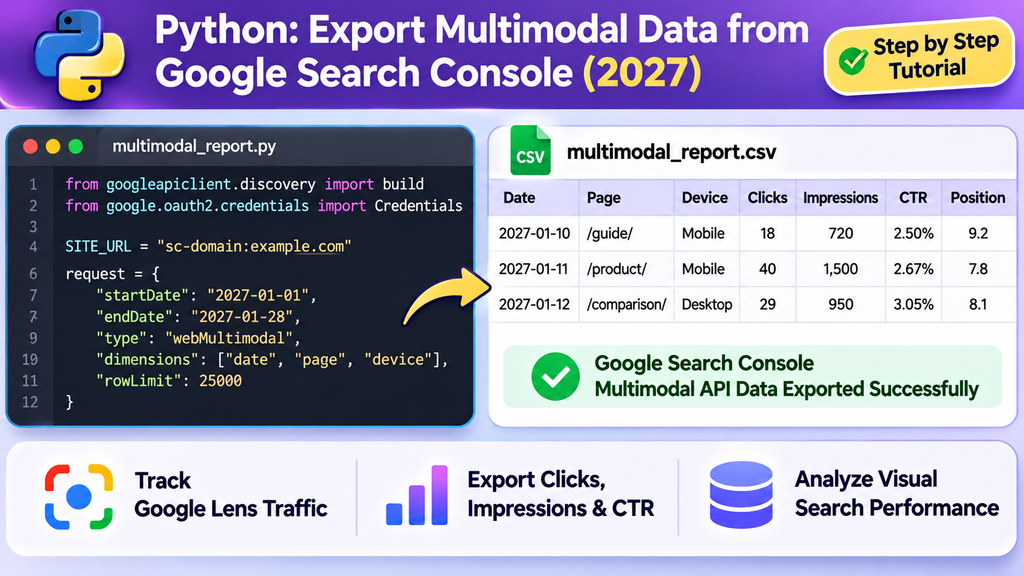
One of the most useful applications of the Google Search Console multimodal API is automated performance reporting.
Instead of manually downloading reports, you can use Python to request data and save it into a CSV file.
This is especially useful when managing multiple websites or comparing performance across reporting periods.
Step 1: Prepare your environment
You’ll need:
- Python 3.
- A verified Google Search Console property.
- A Google Cloud project.
- The Search Console API enabled.
- OAuth 2.0 desktop credentials.
- Appropriate Search Console property permissions.
Install the required packages:
pip install --upgrade google-api-python-client google-auth-oauthlib google-auth-httplib2 pandasStep 2: Configure API access
Open Google Cloud Console.
Create or select a project and enable the Search Console API.
Configure the Google Auth platform as required, create an OAuth desktop application client, and download the client credentials.
Save the downloaded JSON file as:
credentials.json
Create a project folder containing your credentials and Python script.
Keep OAuth credentials private.
Step 3: Create the Python script
Create a file named multimodal_report.py.
Use the following implementation:
from datetime import date, timedelta
from pathlib import Path

import pandas as pd

from google.oauth2.credentials import Credentials
from google.auth.transport.requests import Request
from google_auth_oauthlib.flow import InstalledAppFlow
from googleapiclient.discovery import build
from googleapiclient.errors import HttpError


SCOPES = [
    "https://www.googleapis.com/auth/webmasters.readonly"
]

# Use the exact property identifier in Search Console.
# Domain property example:
SITE_URL = "sc-domain:masterseotool.com"

# Use a completed reporting period.
# Adjust the dates to analyze any available 2027 data.
END_DATE = date.today() - timedelta(days=3)
START_DATE = END_DATE - timedelta(days=27)

ROW_LIMIT = 25000


def authenticate():

    token_path = Path("token.json")
    credentials = None

    if token_path.exists():
        credentials = Credentials.from_authorized_user_file(
            str(token_path),
            SCOPES
        )

    if not credentials or not credentials.valid:

        if (
            credentials
            and credentials.expired
            and credentials.refresh_token
        ):
            credentials.refresh(Request())

        else:
            flow = InstalledAppFlow.from_client_secrets_file(
                "credentials.json",
                SCOPES
            )

            credentials = flow.run_local_server(port=0)

        token_path.write_text(
            credentials.to_json(),
            encoding="utf-8"
        )

    return credentials


def fetch_multimodal_data(service):

    all_rows = []
    start_row = 0

    while True:

        body = {
            "startDate": START_DATE.isoformat(),
            "endDate": END_DATE.isoformat(),
            "type": "webMultimodal",
            "dimensions": [
                "date",
                "page",
                "device"
            ],
            "rowLimit": ROW_LIMIT,
            "startRow": start_row
        }

        response = (
            service.searchanalytics()
            .query(
                siteUrl=SITE_URL,
                body=body
            )
            .execute()
        )

        rows = response.get("rows", [])

        if not rows:
            break

        all_rows.extend(rows)

        if len(rows) < ROW_LIMIT:
            break

        start_row += ROW_LIMIT

    return all_rows


def main():

    credentials = authenticate()

    service = build(
        "searchconsole",
        "v1",
        credentials=credentials
    )

    try:

        rows = fetch_multimodal_data(service)

        if not rows:
            print("No multimodal rows returned.")
            return

        records = []

        for row in rows:

            keys = row.get("keys", [])

            if len(keys) != 3:
                continue

            records.append({
                "date": keys[0],
                "page": keys[1],
                "device": keys[2],
                "clicks": row.get("clicks", 0),
                "impressions": row.get(
                    "impressions", 0
                ),
                "ctr": row.get("ctr", 0),
                "position": row.get(
                    "position", 0
                )
            })

        if not records:
            print("No usable rows returned.")
            return

        dataframe = pd.DataFrame(records)

        dataframe.to_csv(
            "multimodal_report.csv",
            index=False
        )

        print(
            f"Exported {len(dataframe)} rows."
        )

        print(dataframe.head())

    except HttpError as error:

        print(
            "Search Console API error:",
            error
        )


if __name__ == "__main__":
    main()
Step 4: Run the report
Execute:
python multimodal_report.pyComplete Google’s OAuth authorization flow when prompted.
The script requests available multimodal performance data and saves the returned rows into:
multimodal_report.csv
The report includes:
- Date.
- Page URL.
- Device.
- Clicks.
- Impressions.
- CTR.
- Average position.
The script uses a completed 28-day reporting window. When using it in 2027, it automatically selects recent dates; you can also specify a fixed reporting period.
Important reporting consideration
The script requests available rows in batches. It does not bypass Google’s internal data limitations.
For high-volume properties, review Google’s bulk data export documentation before building a larger reporting system.
7. Understanding the Multimodal API Response
The API returns structured JSON data.
Here is an example of the response format:
{
  "rows": [
    {
      "keys": [
        "2027-01-10",
        "https://www.example.com/guide/",
        "MOBILE"
      ],
      "clicks": 18,
      "impressions": 720,
      "ctr": 0.025,
      "position": 9.2
    }
  ],
  "responseAggregationType": "byPage"
}
This example demonstrates the response structure.
The keys array follows the same dimension order specified in the API request.
In this case:
- Date.
- Page URL.
- Device.
The other fields contain the corresponding performance metrics.
Example performance analysis
| Page | Impressions | Clicks | CTR |
|---|---|---|---|
| Product guide | 720 | 18 | 2.5% |
| Buying guide | 1,400 | 21 | 1.5% |
| Comparison article | 950 | 29 | 3.05% |
These are sample figures for explaining the analysis process.
The buying guide has the most impressions, but the comparison article has the highest CTR.
That suggests different opportunities for investigation.
The buying guide may benefit from reviewing its search intent and content relevance, while the comparison article could provide useful insights into what attracts clicks.
The goal is to understand the relationship between visibility and engagement rather than focusing on impressions alone.
8. How to Find SEO Opportunities Using Multimodal Data
Once you have exported your data, the next step is identifying opportunities.
I recommend organizing your analysis around three questions.
Which pages receive the most impressions?
Start by sorting pages according to impressions.
Pages with strong visibility may already be relevant to visual search users.
Review the content and images to understand why those pages are being discovered.
Which pages have low CTR?
Look for pages with meaningful impressions but relatively few clicks.
Then review:
- Search intent alignment.
- Page relevance.
- Image quality.
- Descriptive headings.
- Content usefulness.
- Mobile usability.
Avoid assuming that every low-CTR page needs a new title.
CTR depends on several factors, including the user’s search experience and ranking position.
Which pages are gaining visibility?
Compare reporting periods.
For example:
| Metric | Previous period | Current period | Change |
|---|---|---|---|
| Impressions | 3,000 | 4,200 | +40% |
| Clicks | 45 | 70 | +55.6% |
| CTR | 1.5% | 1.67% | +0.17 pp |
These illustrative figures show how reporting can reveal growth.
A consistent increase across multiple periods is generally more useful than one unusually strong day.
9. Building a Visual SEO Strategy for 2027
The Google Search Console multimodal API provides performance data, but improving visual search visibility requires a broader content strategy.
Here are the areas I recommend prioritizing.
Create useful, original images
Images should help readers understand the topic.
For example, a technical tutorial benefits from:
- Workflow diagrams.
- Relevant interface screenshots.
- Data visualizations.
- Code examples.
- Before-and-after comparisons.
Avoid adding unrelated images simply to increase the number of visuals on a page.
Use descriptive filenames
A descriptive filename provides additional context.
Instead of:
IMG_0034.webp
Use:
google-lens-search-performance-report.webp
Keep filenames concise and relevant.
Write accurate image alt text
Alt text should describe the image naturally.
For example:
<img
  src="multimodal-search-report.webp"
  alt="Google Search Console multimodal API performance report"
  loading="lazy"
  width="1200"
  height="675"
>
The description should match the image’s actual contents.
Do not use alt text as a place to repeat unrelated keywords.
Improve mobile usability
Visual search experiences often involve mobile devices.
Review:
- Responsive image sizing.
- Page loading performance.
- Text readability.
- Image accessibility.
- Content layout.
A mobile-friendly experience makes it easier for visitors to interact with your content after reaching your website.
Connect visual content with written explanations
Search engines need context.
A diagram becomes more useful when the surrounding text explains its purpose.
For example, if you publish an API workflow diagram, describe the authentication process, request parameters, and resulting data.
This also improves the experience for readers who need more than a visual explanation.
For additional guidance, read Google’s Image SEO best practices.
10. Common Multimodal API Errors and Solutions
Even with the correct request structure, API errors can occur.
| Error | Possible cause | Recommended action |
|---|---|---|
| 401 Unauthorized | Invalid credentials | Reauthenticate |
| 403 Forbidden | Missing property access or API permissions | Verify account access |
| 400 Bad Request | Invalid request parameters | Review request body |
| Empty response | No available rows | Check date range |
| Invalid site URL | Incorrect property identifier | Use the exact Search Console property |
| Incomplete data | Reporting limitations | Review date coverage and API constraints |
Error 1: No multimodal data returned
An empty response does not automatically mean your website has no visual search visibility.
Check the selected reporting period and confirm whether multimodal data is available in Search Console.
You can also simplify the request by grouping only by date.
Error 2: Authentication failure
Confirm that the Search Console API is enabled in your Google Cloud project.
Make sure the Google account used during authentication has permission to access the property.
If necessary, recreate your local OAuth token.
Error 3: Incorrect property identifier
For a URL-prefix property, use the complete verified URL.
Example:
For a domain property, use:
sc-domain:example.com
The identifier must match the property available to your authenticated account.
Error 4: Missing reporting rows
Google may return fewer rows than expected because of data availability and internal reporting limitations.
Pagination can retrieve additional available rows, but cannot guarantee complete underlying data coverage.
11. Multimodal Search Reporting vs. Traditional Keyword Tracking
A common question is whether visual search reporting can replace traditional keyword tracking.
The answer is no.
Both approaches provide different information.
| SEO activity | Main purpose |
|---|---|
| Keyword research | Understand text-based search demand |
| Rank tracking | Monitor positions for selected keywords |
| Search Console performance | Analyze Google Search visibility |
| Multimodal reporting | Analyze supported visual search experiences |
| Technical SEO auditing | Identify accessibility and indexing issues |
The strongest approach combines these data sources.
For example, traditional keyword research can help identify content topics, while multimodal reporting can reveal additional ways users discover relevant pages.
That gives website owners a broader understanding of organic search performance.
12. Useful SEO Tools for Analyzing Your Website
Alongside the Google Search Console multimodal API, other SEO tools can help investigate website performance.
Google Index Checker
Use this tool to investigate whether important pages appear in Google’s index.
Indexing is a foundational consideration when evaluating organic search visibility.
Meta Tags Analyzer
Review your page titles and meta descriptions as part of a broader on-page SEO audit.
Keyword Suggestion Tool
Explore related keyword ideas when planning new content.
Keyword Density Checker
Review keyword usage and identify potentially excessive repetition.
Link Analyzer Tool
Examine page links as part of an internal linking review.
For further reading, explore these related articles:
These resources address complementary SEO topics rather than duplicating this technical tutorial.
13. A Practical Multimodal SEO Checklist for 2027
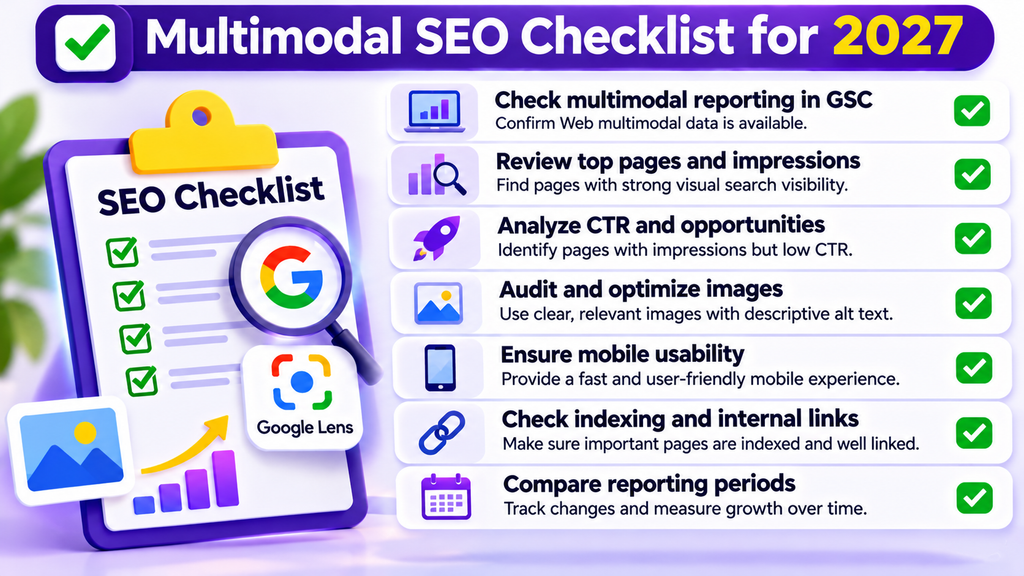
Before making changes to your website, work through this checklist.
| Task | Objective |
|---|---|
| Check Search Console multimodal reporting | Establish data availability |
| Review page-level impressions | Identify visible pages |
| Compare clicks and CTR | Investigate engagement |
| Audit important images | Improve relevance and accessibility |
| Check mobile usability | Support mobile visitors |
| Review indexing | Confirm important pages are accessible |
| Compare reporting periods | Monitor performance changes |
| Export reports | Maintain a historical dataset |
The most important principle is to make changes based on evidence.
For example, if a page has high impressions but few clicks, investigate the page’s content and search context before changing its design.
If a page has no multimodal impressions, that alone is not enough to conclude that its images are poorly optimized.
14. Frequently Asked Questions
What is the Google Search Console multimodal API?
The Google Search Console multimodal API is the Search Analytics API’s capability for retrieving performance data from supported visual search experiences using the webMultimodal search type.
How can I track Google Lens traffic in 2027?
Open Google Search Console and select the Web multimodal reporting filter when available. You can also use the Search Analytics API to retrieve supported performance metrics programmatically.
Is Google Lens traffic included in regular Search Console reports?
Google provides dedicated web multimodal reporting for supported visual search experiences. Use the relevant search-type filter to examine this performance separately.
Can I export multimodal search data into Excel?
Yes. You can export available data from Search Console or use Python to retrieve API results and save them as CSV files that Excel can open.
Can I identify exactly what someone photographed?
The API does not expose the actual photographs or visual selections used by searchers. Its reporting focuses on available search performance metrics and supported dimensions.
Does multimodal search require special structured data?
Google has not established a universal structured-data requirement specifically for inclusion in all supported multimodal search experiences. Follow the structured-data guidance applicable to your page type.
Will multimodal SEO replace traditional SEO in 2027?
No. Visual search introduces additional discovery opportunities, but useful content, technical accessibility, indexing, and search intent remain fundamental.
Can small websites benefit from multimodal reporting?
Yes. Small websites can use available performance data to understand visual discovery opportunities, although reporting depends on actual eligible activity.
Conclusion: Preparing Your SEO Strategy for 2027
Visual search is becoming an increasingly important part of how people discover information online.
Google’s 2026 reporting updates provide website owners with tools to examine this search behavior as they develop their strategies for 2027.
The Google Search Console multimodal API makes it possible to retrieve available performance metrics, export reports, and analyze visual search visibility alongside traditional organic search data.
My recommendation is to begin with Search Console’s built-in reporting, review which pages receive multimodal impressions, and use Python when you need repeatable reporting.
Focus on improving useful content, relevant images, mobile usability, and technical accessibility.
Most importantly, avoid making SEO decisions based on a single metric.
Use clicks, impressions, CTR, page relevance, and reporting trends together to identify opportunities worth investigating.
The goal for 2027 is not simply to appear in more search experiences. It is to attract relevant visitors by creating content that genuinely answers what people are trying to find.