
Why This Situation Happens More Than Most People Think
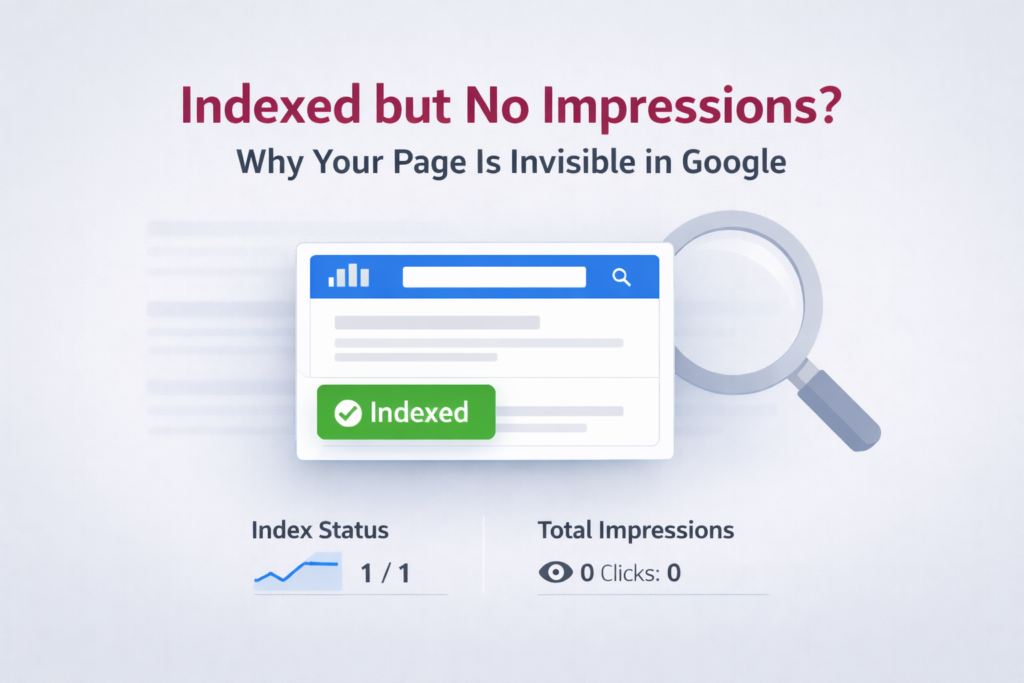
If your page is indexed but receiving no impressions in Google Search Console, it means Google has added the URL to its index but has not recorded it appearing in search results during the selected reporting period. This can happen when the page has limited relevance to the targeted queries, weak search visibility, insufficient content differentiation, or other issues affecting how Google selects results.
This is one of the most misunderstood situations in SEO.
Many site owners assume something is technically broken. In reality, the page is often competing in a query space where Google sees stronger demand alignment, stronger authority, or clearer intent signals elsewhere.
Understanding the difference between indexing and visibility is the first step to diagnosing why a page indexed but no impressions in Google.
Quick Answer
If your page is indexed but receives no impressions in Google Search Console, Google has included the URL in its index but has not recorded it appearing in search results during the selected reporting period.
Common reasons include:
- Low search demand: Few or no users search for the queries your page targets.
- Weak ranking visibility: Your page may rank too low to receive measurable impressions.
- Search intent mismatch: Your content may not sufficiently match what users are looking for.
- Internal linking weaknesses: Search engines may have limited contextual signals about the page’s importance and relevance.
- Keyword cannibalization: Another page on your website may compete for similar search queries.
Remember: Being indexed does not guarantee that a page will receive search impressions or clicks.
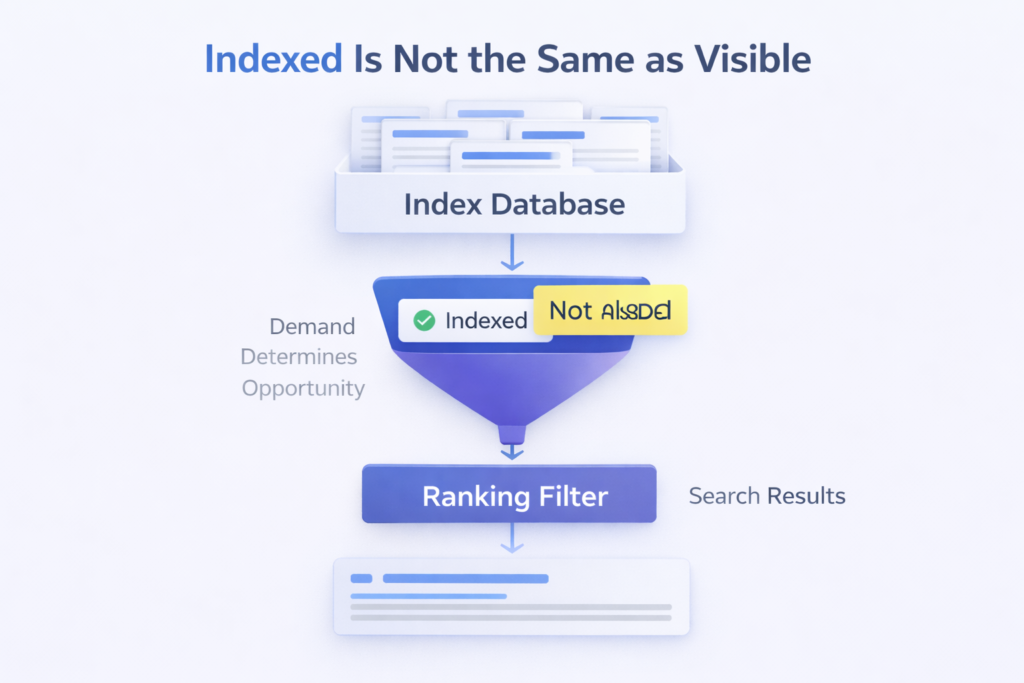
Indexed Is Not the Same as Visible
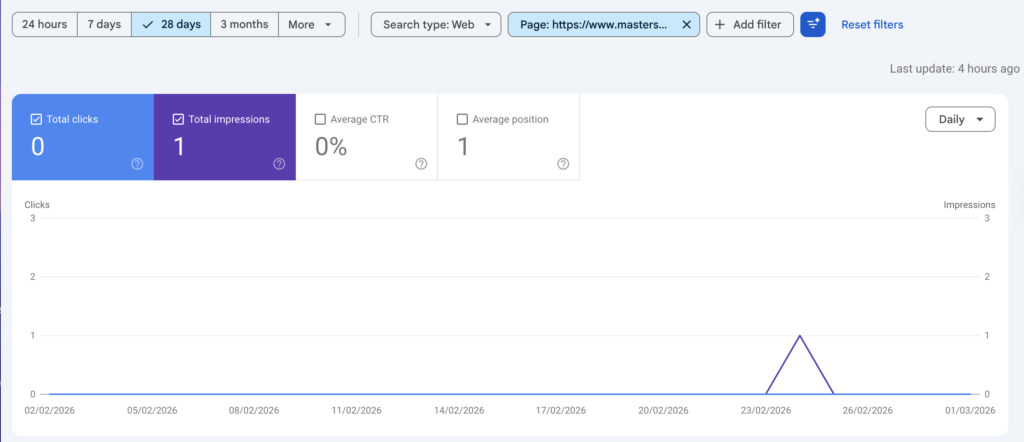
One of the most important things to understand in Google Search Console is that being indexed does not mean your page will automatically appear in search results.
Google Search operates through three main stages:
- Crawling: Google discovers and downloads your webpage.
- Indexing: Google analyzes the page and may store it in its search index.
- Serving search results: Google selects relevant pages to display when someone performs a search.
Passing the indexing stage does not guarantee visibility in the third stage.
Why an Indexed Page Might Not Receive Impressions
Consider a page that appears as indexed in Google Search Console but receives no impressions over a reporting period.
Several explanations are possible:
- The page targets queries with little or no search demand.
- Its ranking positions are too low to generate meaningful visibility.
- Its content does not sufficiently match the intent behind relevant searches.
- Other pages provide more relevant or useful answers to the same queries.
- The page has limited topical support or contextual internal links.
These are potential explanations, not automatic diagnoses. Each requires investigation using search performance data and the actual page content.
How to Interpret the Difference in Google Search Console
| Google Search Console status | What it tells you |
|---|---|
| Page is indexed | Google has included the URL in its index |
| Impressions are recorded | The page appeared in measured search results |
| Impressions but no clicks | The page appeared, but users did not click during the reporting period |
| No impressions | No impressions were recorded for the selected filters and period |
The important distinction: Indexing tells you whether Google has included a page in its index. Performance data tells you whether that page is gaining visibility in search results.
That is why an indexed page with no impressions requires a search-performance diagnosis rather than automatically requiring another indexing request.
Step 1 — Confirm the Page Is Indexed Correctly
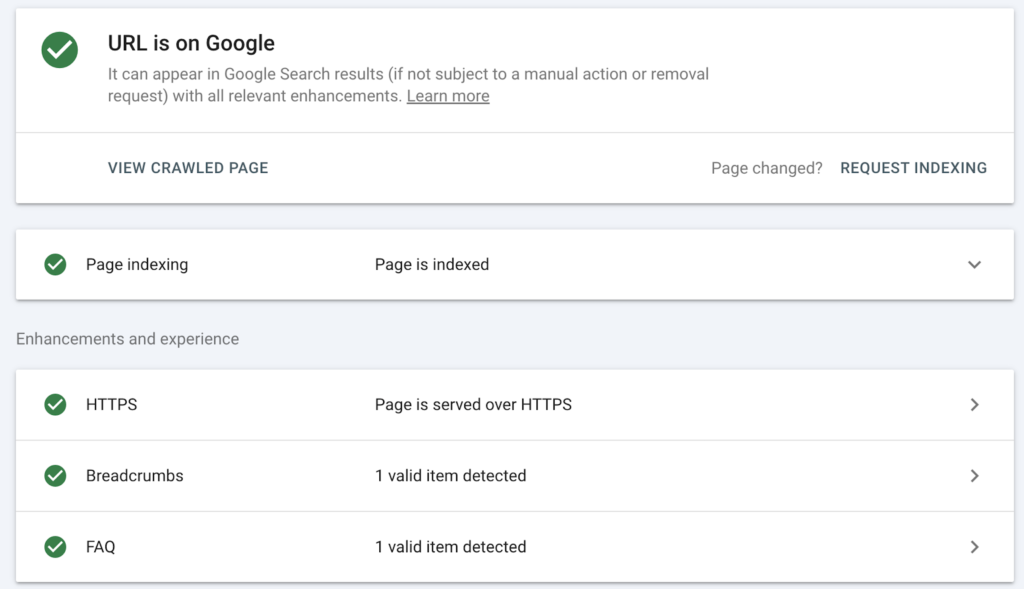
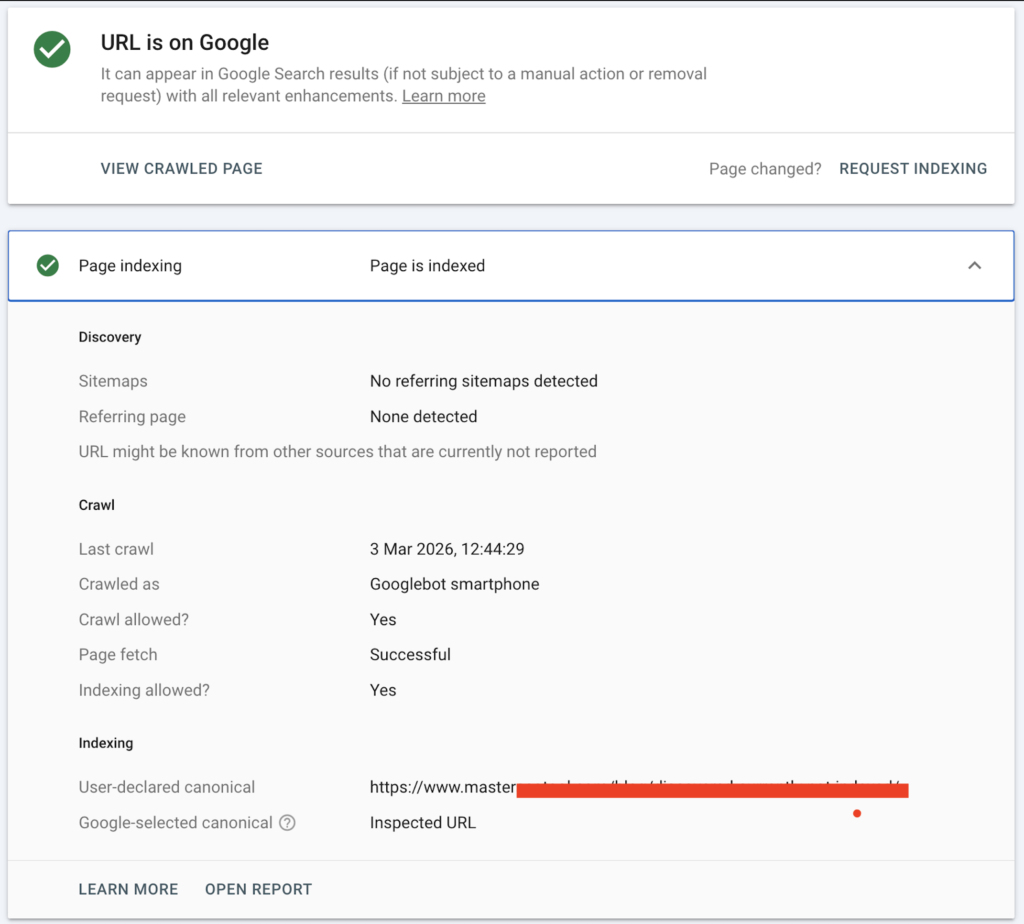
Before investigating why a page receives no search impressions, verify its indexing status in Google Search Console (GSC). An indexing problem requires a different solution from a page that is indexed but has limited search visibility.
1. Check the URL Inspection Report
Open Google Search Console, enter the complete page URL into the URL Inspection tool, and examine the indexed-version report.
Check these five items:
- Indexing status: Confirm that the report says “URL is on Google.”
- Crawl allowed: Verify that Googlebot is permitted to crawl the page.
- Page fetch: Check that Google successfully accessed the URL.
- Indexing allowed: Confirm that the page is not blocked by a noindex directive.
- Google-selected canonical: Verify that Google has selected the intended URL as its canonical version.
You can use the Google Index Checker to perform an additional index-status check.
2. Verify Canonical, Robots and Redirect Settings
An indexed page can still have technical configuration problems that affect how search engines discover and interpret it.
Review the following:
- Canonical URL: Make sure the canonical tag points to the preferred version of the page.
- Robots directives: Check that the page does not contain an unintended noindex directive.
- HTTP response: Confirm that the preferred URL returns a successful HTTP 200 response.
- Redirects: Check that the URL does not redirect unexpectedly.
- Sitemap inclusion: Verify that the preferred canonical URL is included in the appropriate XML sitemap.
For additional checks, use these tools:
- Robots.txt Generator — review and create robots.txt directives.
- XML Sitemap Generator — generate an XML sitemap for website URLs.
3. Understand Common Indexing Problems
If URL Inspection reports an indexing issue, investigate its specific cause before changing the content.
These guides explain common situations:
- Why Is My Page Not Indexed by Google?
- Crawled – Currently Not Indexed: How to Fix It
- Indexed but Not Submitted in Sitemap
- Why Sitemap URLs Are Ignored by Google
4. When the Indexing Checks Pass
If the page is indexed, crawlable, fetchable and has the correct canonical configuration, do not repeatedly request indexing simply because impressions are low.
Move to the next diagnostic stage: investigate whether people search for the topics covered by the page, whether it ranks visibly for relevant queries, and whether its content matches search intent.
Important: Google confirms that “URL is on Google” means the page is eligible to appear in search results, not that it is guaranteed to appear. Read Google’s URL Inspection documentation.
Step 2 — Evaluate Search Demand and Keyword Relevance
A page can be indexed correctly and still receive very few impressions. One possible reason is that the keywords it targets have limited search demand. Another is that the page targets terms that do not closely match what people are searching for.
Before rewriting the content, determine whether people are actually searching for the topic and whether your page addresses their needs.
1. Check Existing Search Queries in Google Search Console
Open Google Search Console and navigate to Performance → Search Results.
Select your target page using the Page filter, then open the Queries tab.
Examine:
- Impressions: Which search queries already trigger your page?
- Clicks: Which queries generate actual visits?
- Average position: How visible is your page for each query?
- CTR: Are users clicking when your page appears?
Look for relevant queries with impressions but few clicks. These are potential opportunities to improve your existing content.
Remember that Search Console only reports queries for which your property has recorded visibility. It does not provide complete market-wide search volume.
2. Research Search Volume Beyond Your Existing GSC Data
If your page receives almost no impressions, investigate whether the target keyword has sufficient search demand.
Start with a primary keyword and identify related search terms, questions and long-tail variations.
You can use these free keyword research tools:
- Keyword Suggestion Tool — discover related keyword ideas.
- AI Keyword Cluster Ideas — organize related keyword opportunities into content groups.
For more detailed keyword research, compare estimated monthly search volume, keyword difficulty and search intent using established SEO platforms.
Do not treat estimated search volume as an exact measurement. Different tools use different databases and estimation methods.
Search volume alone does not determine whether a keyword is suitable for your page.
3. Analyze Search Intent Before Selecting Keywords
You also need to understand what users expect when they search for it.
For example, consider these searches:
| Search query | Likely search intent |
|---|---|
| Why is my website not getting traffic? | Informational |
| Website ranking but no clicks | Informational / problem-solving |
| How to improve organic CTR | Informational / practical |
| Best SEO tools for keyword research | Commercial investigation |
These searches are related to SEO, but they do not necessarily require identical content.
Open Google and examine the actual search results for your primary keyword. Look at the types of pages ranking, the questions they answer, and the information users expect to find.
If the leading results provide practical solutions, a page containing only general explanations may not satisfy the same search intent.
4. Group Related Keywords Instead of Targeting Every Variation Separately
One common SEO mistake is creating a separate article for every slightly different keyword.
Instead, group search queries that share the same topic and search intent. A single well-structured article can answer several closely related searches.
For example:
- Website ranking but no clicks
- Website gets impressions but no clicks
- Why is my website getting no organic traffic?
- How to improve website click-through rate
These terms are related, but you should verify their actual search-result overlap before deciding whether they belong on the same page.
For a deeper explanation, see our guides:
Keyword clustering helps you organize content around user needs rather than publishing multiple pages that compete for the same search intent.
5. Decide Whether to Improve the Existing Page or Target a New Topic
After completing your research, use the findings to make a content decision.
- Relevant keywords have impressions: Improve the existing page to answer those searches more effectively.
- Related keywords have demand but your page lacks coverage: Add useful sections that address the missing questions.
- The keyword has little measurable demand: Consider a more specific, relevant keyword with stronger evidence of interest.
- The search intent is completely different: Consider creating a separate article rather than forcing unrelated topics into one page.
The objective is not to target the largest possible search volume. It is to find relevant search demand that your website can realistically compete for.
Important: Do not rewrite an entire article simply because its primary keyword has few impressions. First examine related queries, search-result patterns and competing pages. Make changes based on evidence, not assumptions.
Step 3 — Check Your Actual Google Rankings
After confirming that your target keyword has search demand, investigate whether your page is appearing in Google Search results.
A page can be indexed and target a relevant keyword but still have very limited ranking visibility.
Start by checking Google Search Console.
1. Review the Performance Report
Navigate to Performance → Search Results and select your target page.
Examine:
- Impressions: Is Google showing your page for relevant queries?
- Clicks: Is the page attracting organic visitors?
- Average position: Where does your page appear for queries that generate impressions?
- Queries: Which keywords are triggering your page?
If the page has zero impressions, Search Console cannot provide an average ranking position for it. This is an important distinction when diagnosing pages with no visibility.
2. Check Rankings for Your Target Keywords
Use an independent keyword rank-tracking tool to investigate whether your page appears for its primary and related keywords.
When checking rankings, make sure you consider:
- Target country and location
- Mobile versus desktop results
- Exact keyword variations
- The correct page URL
- Ranking changes over time
Rankings can differ between locations, devices and search conditions. One manual Google search is not enough to establish a page’s overall ranking performance.
3. Interpret Your Ranking Results
| Ranking situation | What it indicates | Recommended action |
|---|---|---|
| No detectable ranking | No visibility for the tracked keyword | Reassess relevance and competition |
| Positions 50–100 | Very weak visibility | Investigate content and authority gaps |
| Positions 11–30 | Potential ranking opportunity | Improve relevance and content depth |
| Positions 1–10 | First-page visibility | Monitor CTR and query performance |
These are practical diagnostic ranges, not Google’s official ranking thresholds.
4. Identify the Real Ranking Problem
If your page has search demand but cannot establish meaningful ranking visibility, investigate the next factors:
- Does the content fully answer the target search query?
- Are competing pages more relevant or comprehensive?
- Does your website have sufficient topical coverage?
- Are there relevant internal links pointing to the page?
- Is another page on your website targeting the same keyword?
Do not immediately build backlinks or rewrite the entire article. Identify the weakest ranking signals first.
The objective: Establish whether your page has a genuine ranking problem before moving to the next stage of optimization.
Step 4 — Audit Internal Link Authority and Topical Relevance
A page can be indexed but receive little search visibility when it has weak connections to the rest of the website.
Internal links help Google discover pages, understand their context and identify relationships between related content. However, having few internal links does not automatically mean that a page cannot rank.
The objective is to determine whether your target page is properly connected to relevant content across your website.
1. Identify Pages Linking to Your Article
Start by checking which existing pages link to the article you want to improve.
Look for:
- Relevant articles that mention the same subject but do not link to your page.
- Important pages that receive few or no internal links.
- Links coming from unrelated sections of your website.
- Pages that are difficult to reach through your website’s navigation.
You can inspect Google’s discovered internal links through Google Search Console → Links → Internal links.
2. Evaluate the Relevance of Internal Links
Not all internal links provide the same contextual value.
A link from an article discussing Google Search visibility is generally more relevant to this topic than a link from an unrelated article about website design.
Review the following:
- Topical relevance: Does the linking page discuss a related subject?
- Anchor text: Does the clickable text accurately describe the destination?
- Context: Does the link appear naturally within a useful paragraph?
- Accessibility: Can visitors and search engines follow the link?
- Destination: Does the link lead to the correct working URL?
Avoid adding links simply to increase their quantity. Each link should help readers discover genuinely useful information.
3. Strengthen Relevant Topic Connections
If your article lacks contextual links, identify existing pages that can naturally support it.
For example, an article about indexed pages and search impressions can be connected to relevant content about:
- Google Search Console performance.
- Website indexing problems.
- Internal linking and orphan pages.
- Search visibility and ranking improvements.
One useful supporting resource is our guide to fixing orphan pages, which explains how to identify pages that lack internal links.
4. Check Internal Link Structure and Crawlability
Review whether important pages can be discovered through ordinary HTML links.
Google generally recommends using crawlable anchor elements with valid destination URLs. Descriptive anchor text also helps visitors and search engines understand the linked page.
Check for:
- Broken internal links.
- Redirect chains.
- Links pointing to incorrect canonical URLs.
- Important pages with no internal links.
- Generic or misleading anchor text.
5. Decide Whether Internal Linking Is Actually the Problem
After completing the audit, determine whether the page needs additional internal links.
| Finding | Recommended action |
|---|---|
| No relevant pages link to the article | Add contextual internal links |
| Links exist but are unrelated | Replace or reposition them |
| Anchor text is unclear | Improve the anchor text |
| Important pages are difficult to discover | Improve the site’s internal structure |
| Internal links are already relevant and accessible | Investigate other ranking factors |
Important: Internal linking supports discovery and contextual understanding, but it cannot compensate for insufficient search demand, poor content relevance or strong competition.
Improve the connections that genuinely help users, then continue investigating the other possible causes of limited search visibility.
Step 5 — Check for Keyword Cannibalization
Another possible reason an indexed page receives limited search visibility is keyword cannibalization.
Keyword cannibalization occurs when multiple pages on the same website target similar keywords and satisfy the same search intent. This can make it harder to establish which page should be the primary result for a particular search.
However, targeting related keywords across multiple pages is not automatically a problem. Different pages can rank successfully when they serve distinct user needs.
1. Identify Pages Targeting the Same Search Queries
Start with Google Search Console.
- Open Performance → Search Results.
- Select the relevant reporting period.
- Open the Queries tab.
- Select a query that is important to your website.
- Open the Pages tab to identify which URLs receive impressions for that query.
Look for situations where multiple URLs repeatedly appear for the same important queries.
Pay particular attention to cases where rankings fluctuate, the wrong page appears, or impressions are divided between pages with nearly identical purposes.
2. Compare Search Intent Between the Pages
Having similar keywords does not necessarily mean that two pages compete.
Compare their:
- Primary search intent.
- Target audience.
- Main questions answered.
- Content structure.
- Search queries generating impressions.
For example:
| Page | Intended search intent |
|---|---|
| Why Is My Page Not Indexed by Google? | Diagnose indexing problems |
| Why Is My Page Indexed but Getting No Impressions? | Diagnose lack of search visibility |
| Crawled – Currently Not Indexed: How to Fix It | Resolve a specific indexing status |
These articles belong to the same technical SEO topic cluster, but each addresses a different problem.
They should remain separate because they serve different search intents.
3. Choose the Correct Solution
If you identify genuine keyword cannibalization, select the solution based on the relationship between the pages.
| Situation | Recommended action |
|---|---|
| Pages serve different search intents | Keep both and clarify their targeting |
| Pages overlap but provide different value | Differentiate their content and headings |
| Two pages serve almost identical intents | Consider consolidating their useful content |
| One page is redundant and has a suitable replacement | Consider a relevant 301 redirect |
| Pages are duplicates or near-duplicates | Evaluate canonicalization where appropriate |
Do not automatically delete a page, redirect it or add a noindex directive simply because it shares keywords with another article.
4. Prevent Future Keyword Cannibalization
Before publishing new content:
- Assign a clear primary search intent to each article.
- Review existing pages targeting similar queries.
- Use keyword clustering to identify overlapping topics.
- Give each article a distinct purpose.
- Use contextual internal links to connect related articles.
The goal is to build a structured content library in which each page has a clear role.
Important: Multiple URLs appearing for the same query are not sufficient proof of a cannibalization problem. Examine search intent, URL performance and ranking changes before making structural changes.
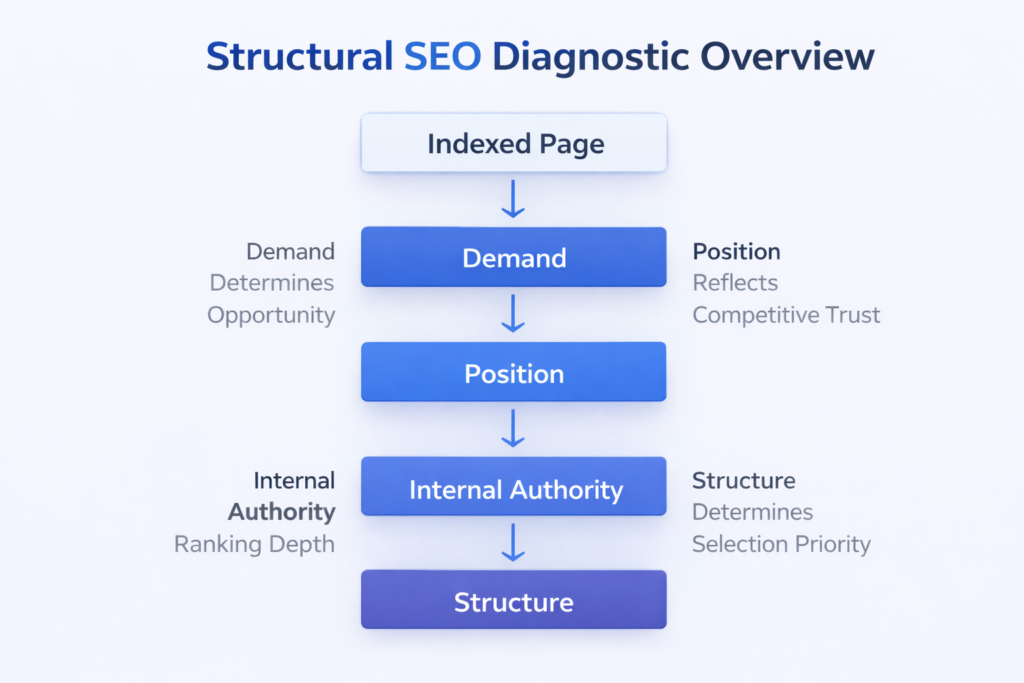
Structural Diagnostic Framework: Why Indexed Pages Get No Impressions
When a page is indexed but receives no search impressions, the problem should be investigated across several areas rather than assuming that indexing is the issue.
Use this framework to identify which part of your SEO strategy needs attention.
1. Search Demand
Diagnostic question: Are people searching for the topics and keywords targeted by the page?
Check:
- Search queries in Google Search Console.
- Related keyword opportunities.
- Search demand estimates from keyword research tools.
- Whether the target topic matches actual user searches.
Recommended action: Refine keyword targeting when the page addresses terms with insufficient demand or an unclear search intent.
2. Ranking Visibility
Diagnostic question: Is Google showing the page for relevant search queries?
Check:
- Impressions and average position in Google Search Console.
- Query-level performance.
- Rankings for relevant keywords.
- Whether the page is competing with more relevant results.
Recommended action: Investigate content relevance, competing pages and ranking opportunities.
3. Internal Authority and Relevance
Diagnostic question: Does the page have meaningful connections to related content on your website?
Check:
- Relevant internal links pointing to the page.
- Descriptive anchor text.
- Related supporting articles.
- Orphan pages and weak internal navigation.
Recommended action: Improve relevant internal links and strengthen connections between related content.
4. Content and Search Intent
Diagnostic question: Does the page provide the information users expect when searching for its target keywords?
Check:
- Search intent behind the primary keyword.
- Coverage of relevant questions.
- Accuracy and usefulness of the information.
- Differences between your page and competing search results.
Recommended action: Improve the sections that fail to address user needs. Preserve content that already provides value.
5. Technical and Structural Health
Diagnostic question: Can Google access, interpret and understand the intended page correctly?
Check:
- HTTP response and crawlability.
- Canonical configuration.
- Robots directives.
- Internal link accessibility.
- Duplicate or conflicting URLs.
Recommended action: Correct verified technical problems before making unnecessary content changes.
Diagnostic Summary
| Diagnostic area | Possible finding | Next action |
|---|---|---|
| Search demand | Target queries have little demand | Reassess keyword targeting |
| Ranking visibility | Page has weak ranking visibility | Investigate relevance and competition |
| Internal structure | Page has few relevant incoming links | Improve contextual linking |
| Content relevance | Page does not satisfy search intent | Improve specific content gaps |
| Technical health | Crawl or canonical problems exist | Fix the verified technical issue |
How to use this framework: Start with indexing, then investigate search demand and ranking visibility. Continue with internal linking, content relevance and technical health. Address the problems supported by evidence rather than applying every possible SEO change.
Content-Intent Alignment
Another reason an indexed page may receive no impressions is a mismatch between its content and the intent behind relevant search queries.
Even when a page targets the correct keywords, it may struggle to gain visibility if it does not provide the information users expect.
How to Identify a Search Intent Mismatch
Search your primary keyword on Google and examine the top-ranking results.
Compare your page against them:
- Content type: Are users expecting a tutorial, comparison, tool or explanation?
- Topic coverage: Does your page answer the main questions behind the search?
- Content structure: Are important sections and information easy to find?
- Practical value: Does your page provide useful explanations, examples or solutions?
How to Fix the Problem
If your content does not match the dominant search intent:
- Adjust headings to address the actual questions users are asking.
- Add missing information that improves the reader’s understanding.
- Remove unrelated or repetitive sections.
- Improve outdated or inaccurate explanations.
- Make sure the introduction and title accurately represent the content.
Do not copy competing pages or add paragraphs simply to increase word count.
Important: Your objective is to satisfy the searcher’s needs more effectively, not simply to include more keywords.
Crawl Priority and Reassessment
After improving a page, Google needs to recrawl it to discover the changes. However, requesting another crawl does not guarantee faster indexing or improved rankings.
Before requesting a recrawl, check:
- The page returns a successful HTTP response.
- The URL is accessible to Googlebot.
- The canonical URL is correct.
- The updated page is included in your XML sitemap.
- Important internal links point to the correct URL.
If you have made significant changes, you can use Google Search Console’s URL Inspection tool to request indexing.
For WordPress websites, Google may also discover updated content through the sitemap automatically.
Important: Repeatedly requesting indexing for an unchanged URL does not make Google crawl it faster. Allow time for Google to process meaningful changes and monitor the URL through Search Console.
See Google’s official guide: Ask Google to Recrawl Your Website.
How Long Does It Take to See Search Impressions?
It is normal for a newly published or updated page to receive no search impressions initially. However, there is no fixed timeline for when a page will start appearing in Google Search.
Three different processes should be considered:
- Crawling: Google discovers and visits your URL.
- Indexing: Google processes the page and may add it to its index.
- Search visibility: Google displays the page for relevant search queries, generating impressions.
These processes are related, but completing one does not guarantee the next.
When Should You Investigate?
Use the following guidelines:
| Situation | Recommended action |
|---|---|
| Newly published page | Monitor crawling and indexing |
| Recently updated page | Allow Google to recrawl the changes |
| Indexed page with zero impressions | Investigate search demand and ranking visibility |
| Zero impressions despite relevant search demand | Review content relevance, competition and internal links |
| Impressions without clicks | Evaluate rankings and search-result presentation |
Google explains that crawling can take anywhere from a few days to a few weeks, and requesting indexing does not guarantee immediate inclusion or visibility.
Monitor Performance in Google Search Console
Use the Performance report to monitor:
- Total impressions.
- Total clicks.
- Average position.
- Search queries generating impressions.
- Changes in performance over time.
Allow sufficient time for Search Console data to accumulate before drawing conclusions.
Important: Do not assume that a page has a technical SEO problem simply because it receives zero impressions during its first few weeks. Investigate its actual search demand, indexing status and ranking opportunities before making changes.
For more information, see Google’s guide to crawling and indexing.
Visibility Classification
Use Google Search Console data to identify the current visibility problem before deciding what to change.
| Search Performance | Possible Interpretation | Recommended Action |
|---|---|---|
| Zero impressions | No recorded search visibility | Investigate demand, indexing and keyword targeting |
| Few impressions | Limited search exposure | Review query relevance and ranking opportunities |
| Impressions with low average position | Weak ranking visibility | Improve content relevance and competitive coverage |
| Impressions with good positions but few clicks | Possible CTR problem | Review SEO title and meta description |
| Impressions and clicks increasing | Improving organic visibility | Monitor performance and preserve effective changes |
How to Interpret the Results
Do not evaluate impressions, clicks or average position separately. Review all three metrics together and examine the actual queries generating impressions.
For example, a page receiving impressions at an average position of 65 needs a different optimization strategy from a page receiving impressions at position 8 but attracting very few clicks.
Use the Google Search Console Performance Report to investigate these differences.
Important: These are diagnostic patterns, not fixed Google ranking thresholds. Base your decisions on actual page and query performance.
FAQs
Why is my page indexed but getting no impressions?
An indexed page can receive zero impressions when it does not rank for relevant search queries, targets keywords with little search demand, or faces strong competition. Check Google Search Console to identify whether the problem is keyword targeting, ranking visibility or content relevance.
How long does it take for an indexed page to get impressions?
There is no guaranteed timeline. A page may start receiving impressions shortly after indexing or take considerably longer. Monitor its performance in Google Search Console rather than relying on a fixed number of days.
Can a page be indexed but not rank on Google?
Yes. Indexing means Google has stored the page in its index, but it does not guarantee that the page will appear prominently in search results. Ranking depends on relevance, content quality, competition and other search systems.
Can internal links help an indexed page get more impressions?
Yes. Relevant internal links help Google discover pages and understand their relationship to other content. They can support SEO visibility, but adding more internal links does not guarantee higher rankings or impressions.
What should I check first when my indexed page has zero impressions?
Start by confirming the indexing status in Google Search Console. Then investigate search demand, actual ranking queries, content relevance, competing pages and internal linking. Identify the underlying problem before changing the article.
Final Perspective
When a page is indexed but receives no impressions, the solution is not necessarily to rewrite the content or request indexing again.
Start by identifying why the page is not appearing in relevant search results.
Check its search demand, ranking queries, content relevance, internal links and technical health. Use Google Search Console to identify where visibility is missing and which improvements are supported by actual performance data.
Most importantly, distinguish an indexing problem from a ranking problem. Google can index a page without showing it prominently for the searches you want to target.
The goal is not simply to get indexed. It is to become visible for relevant searches and attract visitors who need your content.